Developing locally with Next.js App Router SDK
Developer preview
Developer Preview
This page documents the developer preview of the SDK, version 20.81.1-alpha.25.sha-f076f9b857.
Local development tips#
This page tells you how the SDK behaves under next dev, and how to see your content changes fast.
The resolvers do not cache in development#
When NODE_ENV is development, the resolvers of @uniformdev/next-app-router do not use the Next.js data cache. They get the route and the composition from Uniform on each request. Thus a page shows newly published content when you load it again. The 'use cache' resolvers of @uniformdev/next-app-router/cache are different: they keep published results also in development.
The Context manifest is different. UniformContext gets the published manifest with force-cache, also in development. If a new signal or test does not work locally, do a hard reload of the page in the browser. If that does not help, delete the .next folder:
note
next build and next start use the production behavior. Then the resolvers cache published content until a webhook revalidates it. Refer to Caching.
See draft content#
You do not have to publish content to see it locally. In Next.js draft mode, the SDK gets draft content and does not use the cache.
To enable draft mode, open your local app from the Uniform preview panel:
- Open a composition in Canvas.
- Open the preview panel.
- From the menu of the preview panel, select Open in new window.
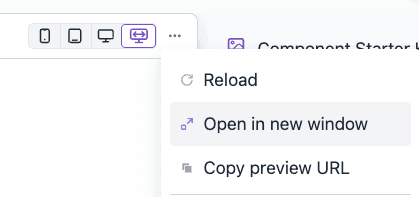
The preview handler enables Next.js draft mode and opens the page. While draft mode is on:
- The SDK gets draft content.
- The resolvers do not use the cache.
- The browser chooses the personalization and test variants. Edge mode does not apply to draft requests.
To turn off draft mode, open /api/preview?disable=true&path=/ in the same browser.
note
Set UNIFORM_PREVIEW_SECRET in .env.local. It must be the same as the secret in the preview URL of your Uniform project. If it is not set, the preview handler answers 401 No preview secret is configured.
Edge mode under next dev#
The Vercel edge middleware works under next dev, without the Vercel runtime cache:
vercelManifestProvidergets the manifest from the Uniform API, and keeps a copy in memory.vercelEdgeRouteStorekeeps its records in memory.expireVercelRuntimeCacheTagsdoes nothing.
To use the Vercel runtime cache locally, set RUNTIME_CACHE_ENDPOINT.
Under next dev, Next.js shows deprecation warnings for middleware.ts and for the edge runtime. These warnings are expected. Refer to Keep middleware.ts on the edge runtime.
Do a test of edge mode locally#
Edge personalization uses a published page from the cache, so do the test on a production build:
Build and start the app:
npm run build && npm run startOpen a page that has a personalization, with a URL that activates a signal. For example,
http://localhost:3000/?utm_campaign=launchfor a signal that reads theutm_campaignquery string.Look at the HTML of the response. It must contain only the personalized variant:
curl -s "http://localhost:3000/?utm_campaign=launch" | grep -o '__UNIFORM_DATA__[^<]*'The
__UNIFORM_DATA__script contains the scores of the visitor.
Summary#
| Problem | Solution |
|---|---|
| A new signal or test does not work locally | Do a hard reload, or delete .next and start the dev server again |
| You want to see content before you publish it | Open the app from the Uniform preview panel (draft mode) |
| You want to see edge personalization | Use a production build: npm run build && npm run start |